Colurvist › The video editor
A free online video editor with a real timeline, colour, sound and AI
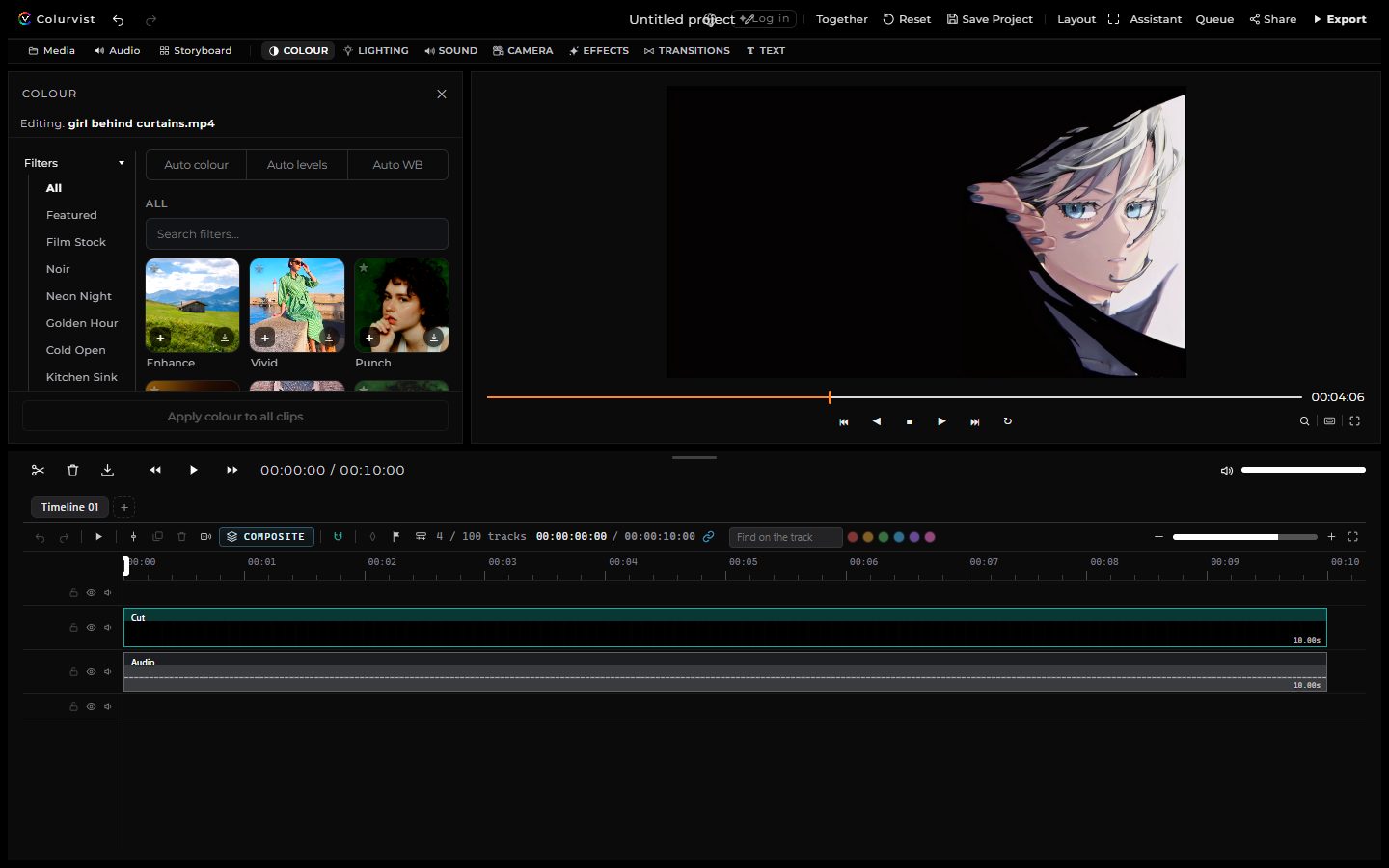
Colurvist’s editor runs in your browser: no install, nothing uploaded while you cut, and the things a desktop editor has — a multi-lane timeline, scopes, a mixer, captions, titles, transitions, keyframes. Editing and exporting up to 1080p are free; the AI tools are there when you want them, each with its price shown first.
What it does
A real timeline
Cuts on free lanes, trims, slips and rolls, ripple delete, snapping, groups, markers, three-point editing from a source monitor, nested sequences, keyframes with easing — and the track draws only what is in view, so 500 clips stay quick.
Colour
Looks, curves and colour wheels, lift / gamma / gain, a GPU qualifier and hue curves, 3D LUTs in and out, camera log profiles, auto colour, face retouch and denoise, and real scopes: waveform, parade, vectorscope, histogram.
Sound
A mixer with loudness metering, EQ, compressor and limiter, reverb and echo, ducking under speech, a voice changer, noise reduction, level and pan lanes, beat detection and a montage cut to the music.
Text and captions
Titles with animations, text on a path, letter animations, stickers and emoji; captions typed or transcribed (1 credit a minute), word-level highlighting, templates per platform, SRT / VTT / ASS in and out, translation.
Effects and transitions
Motion effects, overlays and particles, generative VHS / CRT / datamosh looks, shape and pen masks that track a subject, wipes and true dissolves, a cut's own in and out, picture-in-picture layers with chroma key.
Export
MP4 / HEVC / WebM at 23.976–60 fps, a frame-accurate renderer, a render queue, platform presets, a marked-range export, GIF, stems, EDL / FCPXML / OTIO, publishing to YouTube, TikTok and Instagram.
AI, priced first
Captions, chapters and post copy from the words, face blur, smart highlights, auto reframe, upscaling and frame interpolation, a lip-synced dub, and an assistant that sees the frame and runs the editor for you.
Your own way of working
Change any shortcut, save workspaces, keep projects and versions in your account, make review links where people comment at a moment of the video, and detach the preview onto a second screen.
Free, and what costs credits
Everything that runs on your computer is free: importing, the timeline, colour, sound, titles, captions you type, transitions, effects, masks and tracking, and exports up to 1080p. Only the AI tools that run on the server, and exports above 1080p, use credits:
| Tool | Credits |
|---|---|
| Captions from speech | 1 a minute |
| Translate captions or titles | 1 per 1,000 characters |
| The assistant, one step | 2 |
| AI upscale 2× · 4× | 70 · 160 |
| Export at 1440p · 4K · 6K · 8K | 10 · 25 · 40 · 60 |
| Voice split · music bed | 12 · 15 a minute |
| AI video generation | depends on the model, from 25 for 5 seconds |
A job that fails is not charged. The chip in the editor’s top bar shows your balance and the same prices.
For everyone
- Keyboard: F6 moves between the top bar, the library bar, the edit column, the picture and the track; every shortcut can be changed; Ctrl+K finds any command or answers “how do I…”.
- Screen readers: icon-only buttons are labelled, the tool tabs are a tab list, messages are read out, dialogs take and return focus.
- High contrast theme (the system setting picks it), reduced motion, and 13 languages for the controls.
- Phones and tablets: one scrolling column, finger-sized handles on the track, pinch to zoom the picture.
Guides
Questions
Is the Colurvist video editor free?
Yes. Importing, editing, grading, captions you type yourself, sound mixing, titles and transitions are free, and exporting up to 1080p is free. Only AI tools and exports above 1080p use credits, and each shows its price before it runs.
Is my footage uploaded?
No. The editor runs in your browser: decoding, the timeline, the grade and the export all happen on your computer. A clip is sent to the server only for a server AI job you start, or when you choose to save a project to the cloud or make a review link.
What files can I import?
MP4, MOV, WebM, GIF, numbered image sequences, stills (JPEG, PNG, WebP, HEIC) and sound (MP3, WAV, AAC, FLAC and more). A file the browser cannot play, such as AVI, MKV or ProRes, is converted to an MP4 inside the editor.
What can I export?
MP4 (H.264 or HEVC) and WebM, at any frame rate from 23.976 to 60, up to 4K and beyond with AI upscaling; a GIF; a WAV of the mix; an image sequence; EDL, FCPXML and OpenTimelineIO for another editor; and a project file that carries every media item.
Does it work on a phone?
Yes. The stage, the tools and the track stack in one column, the controls are finger-sized, and the picture can be pinched. A laptop or desktop is still the comfortable place for a long edit.
Does it work with the keyboard and screen readers?
Yes. F6 moves between the areas of the editor, every shortcut can be changed, Ctrl+K finds any command or answers "how do I…", icon-only buttons are labelled, messages are read out, and there is a high-contrast theme.
Last reviewed 3 October 2026.